Showing posts with label disable. Show all posts

Tuesday, September 6, 2016

Mengembalikan Regedit yang Disable by Your Administrator

Mengembalikan Regedit yang Disable by Your Administrator


Saat kita akan mengedit registri, ada kalanya fungsi regedit di Windows tidak bisa diakses alias disable. Ini bisa dikarenakan oleh virus, atau juga memang oleh sang Administrator telah di-disable untuk mencegah orang yang tidak berkepentingan mengutak-atik setting Windows. Kalau anda pernah mengalami kejadian seperti ini Registry Editing has been disable by your Administrator ketika memasukkan perintah REGEDIT pada menu RUN
Inilah solusi singkat yang mungkin bisa membantu anda mengatasi masalah seperti diatas.
Klik Menu [Start] – [RUN] dan masukkan perintah : GPEdit.msc

Akan muncul Windows Group Policy, selanjutnya arahkan ke [User Configuration] – [Administrative Templates] – [System].


Setelah itu pada jendela sebelah kanan (panel setting) Double Klik Prevent Access to Registry Editing Tools

Pada jendela yang muncul pilih NOT CONFIGURED atau DISABLED, untuk mengaktifkan kembali fungsi regedit.

Klik OK
Sekarang coba anda akses registry editor lewat menu [RUN] - REGEDIT kalau masih belum berhasil, Restart Komputer anda dan coba akses lagi registry editor.
Bila ternyata Solusi tersebut masih juga kurang ampuh, Tinggal Download REGTOOLS dari Doug Knox, Save dan kemudian jalankan regtools, ini berfungsi untuk meng-enable dan disable registry. Bila kondisi registry editor disable, maka regtool akan meng-enable-kannya, begitupun sebaliknya.

selamat mencoba

download now

Read More

Cara Menonaktifkan disable Update Otomatis di Windows 10

Cara Menonaktifkan disable Update Otomatis di Windows 10


Cara Menonatktifkan Update Otomatis di Windows 10

Mungkin sebagian pengguna, mengaktifkan Update Windows akan menghabiskan beberapa resource bandwidth internet atau juga membuat koneksi internet menjadi lambat, atau juga dirasa kurang begitu diperlukan.

Dalam hal tersebut, windows 10 memang membuat fiture Windows Update nya dibuat otomatis berjalan dan tidak ada pilihan menu untuk men-Disable atau menonaktifkanya.

Tools ini bekerja untuk Disable ataupun Enable kan Update otomatis windows. jadi enggak seenak jidat maen download update secara otomatis. :v


Otomatis Update Windows dalam keadaan Aktif/Enable


Otomatis Update Windows dalam keadaan nonAktif/disable

Langkah menggunakanya
setelah terdownload, silahkan extract
kemudian jalankan ” Auto-Update-Enable_Disable-Win10?
lalu ketik Y atau N saat script di jalankan, ikuti perintah nya.
done
maka Windows Tidak akan Update Otomatis,

size: 300 Kb

=> Auto Update Disable Enable khusus windows 10
Source and Password: www.kuyhaa-android19.com

download now

Read More

Thursday, August 18, 2016

How to Enable and Disable Bash Ubuntu in Windows 10

How to Enable and Disable Bash Ubuntu in Windows 10


On the Build 2016 event april 13 2014, Microsoft made a new innovation for the Developer, by adding native linux bash that you can actually run directly through Windows 10.

And since the release of the Build 14 316, you can run in Windows 10. Bash ubuntu linux There are many command-line that you can run like awk, grep, sed, and you also can run Linux tools such as Ruby, Python, etc.

Well in this tutorial. WinPoin will give way to activate and turn off the Ubuntu Bash features in Windows 10.

Note: To run this tutorial. Make sure you sign-in using the Administrator account.

Enabling Bash Ubuntu

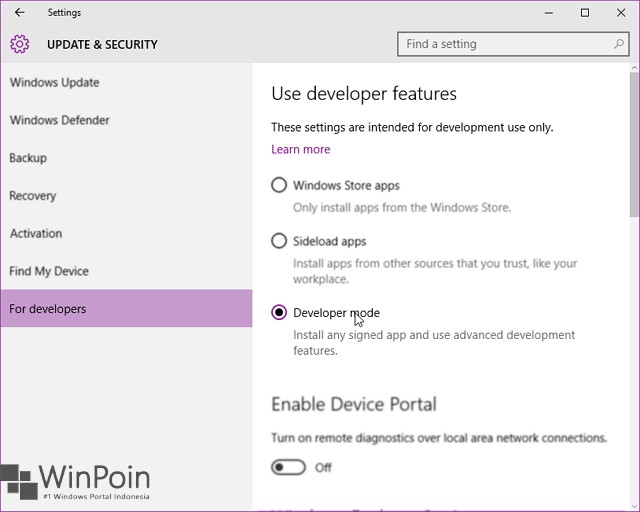
First go to Settings (Winkey + I), then navigating to Update & security - For developers. Then select the Developer mode.


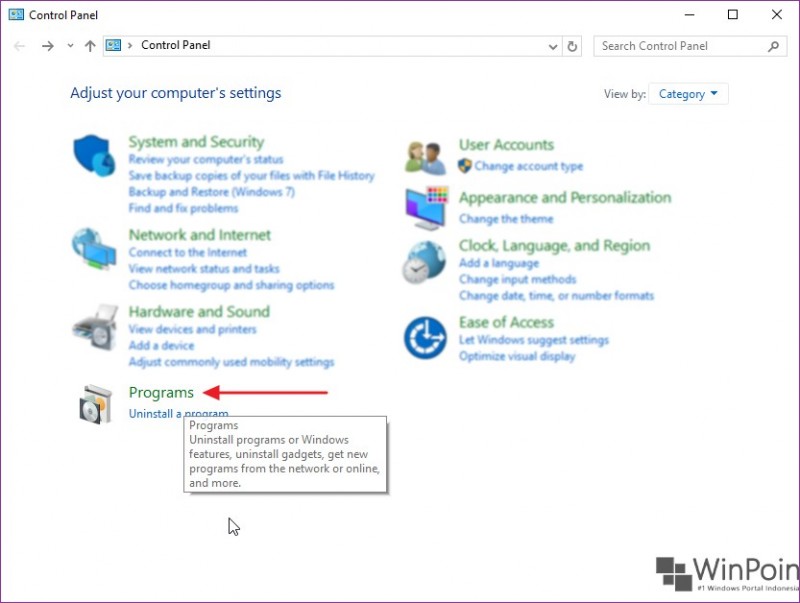
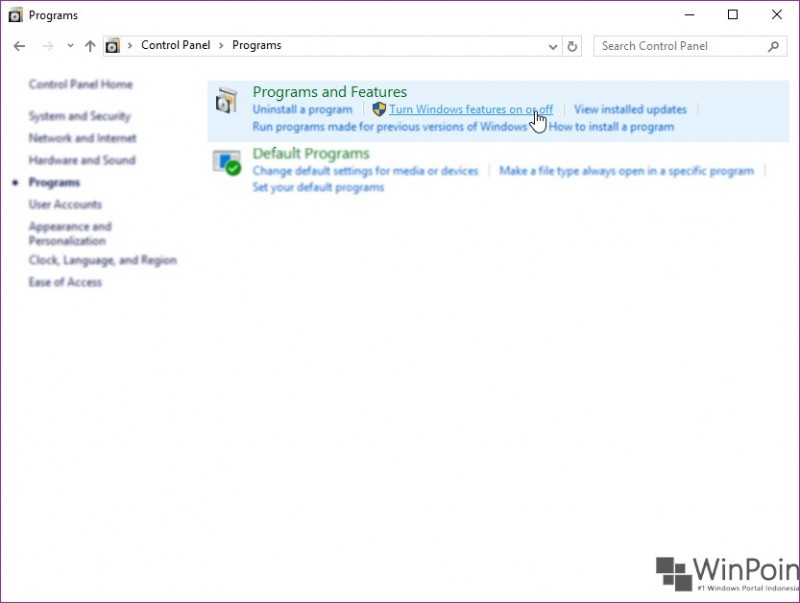
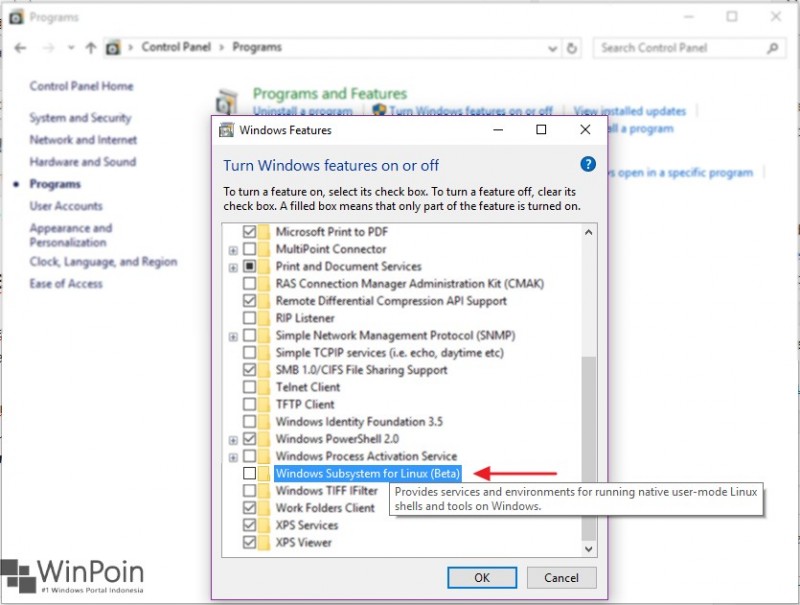
Next, open the Control Panel and navigate to his Program and Feature - Turn Windows features on or off.


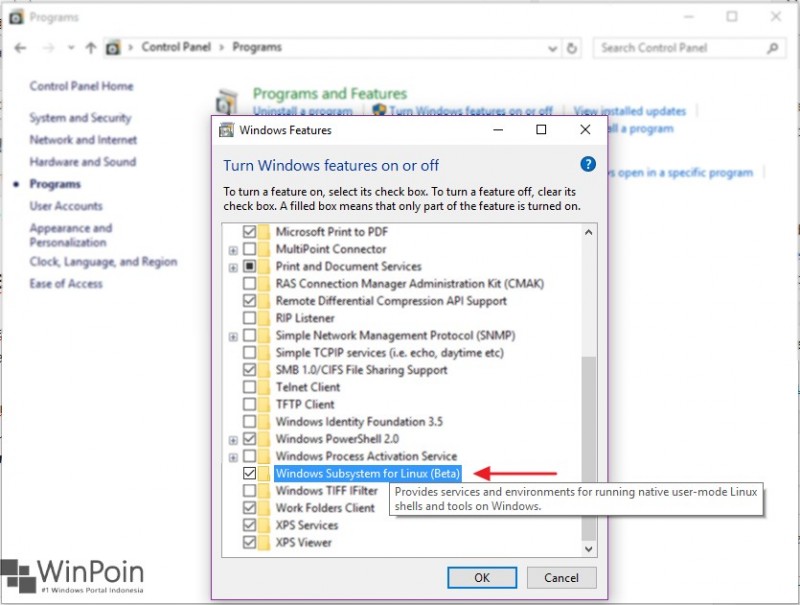
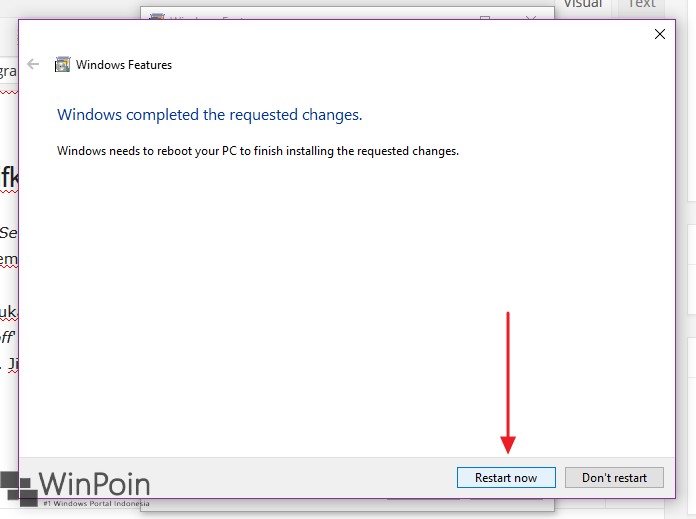
Then scoll down and then turn on the option Windows Subsystem for Linux (beta). If you already click OK. Wait a while until the process is complete, and you are asked to reboot the system.


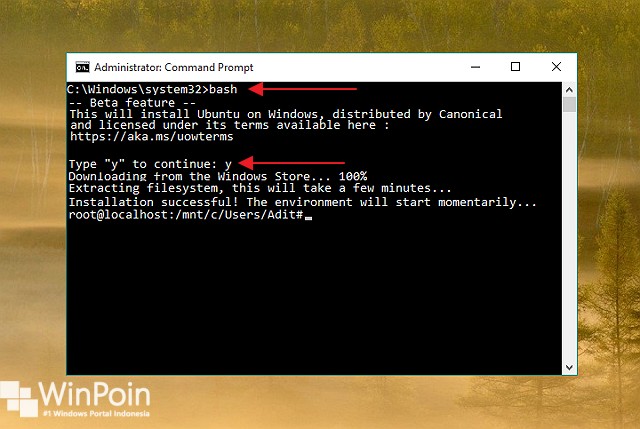
After re-login system, open a Command Prompt and typing bash commands and typing return Y. This step is to install bash on Windows. Wait a while until the process is complete (requires an Internet connection to download the file system bash). Once completed then you can directly operate.


Disabling Bash Ubuntu

To disable the feature Bash. The trick is to reopen the Windows Feature and then uncheck the Windows Subsystem for Linux (beta). Then reboot the system to save the changes.


download now

Read More