Fix Yellow Tint Display on Android Phone tablet
Have you noticed that your smartphone’s screen is slightly yellower than normal i.e. the whites look yellowish or too warm. Many people won’t notice this pale Yellow display problem unless they put their smartphone or tablet side-by-side with another device and compare the white levels of the screen. Even the latest Nexus 6p and Nexus 5x has been affected by this problem. While many people are perfectly fine with the yellowish or warmer tone of their IPS or AMOLED displays, some prefer the cooler or more natural color temperature on their device screen. If your screen is too yellow you can remove this excess yellow color by customizing the color temperatures to your preference via screen filter apps.
Many Android devices have built-in display temperature app that allows users to customize the Red Green Blue (RGB) color values. If your phone or tablet has such a feature, simply increase the value of “Blue” color until you get rid of the annoying yellow tint. If such feature is not available, you can install third party color customizer or screen adjuster/filter apps available in Google Play Store. One such app is “screen adjuster”.
How to fix yellow display problem in Smartphones and tablets

- Download screen adjuster app (free on Google Play)
- Open the app and then set the value for “Blue” color to 8 or 9.
- You may need to set it higher depending upon how yellow your display is.
- Tap on “Adjuster On”
- Also enable “Autorun” option at the bottom
NOTE: Installing screen filter apps may prevent third party app installation by disabling the “install” button. Thus, disable the screen filter before you install any APK files. You can turn the filter back on after installation.
download now




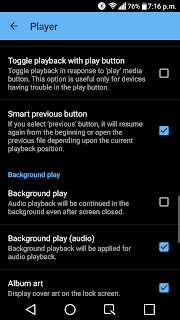
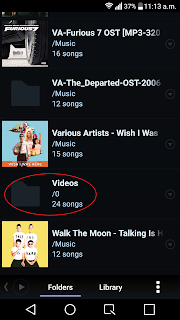 Poweramp will detect all your video files as songs and play it just like any other audio files. Though Poweramp is a paid app, it will give you more audio control that Mx Player. Another drawback of MX Player is that it doesn’t have a built-in playlist creator, so you will have to manage videos in separate folders if you want some videos to play together. On Poweramp you can manage the video files just like audio files and add them to playlists and also tweak the audio to your liking using the built-in equalizer.


 Many Android users spend a lot of time setting up their smartphone or tablets desktop with useful widgets and quick access folders for different category of apps. However, this desktop layout/design will get lost if you or someone accidentally changes it. Then youll have to again spend time putting those items on the desktop. The feature to save the home screen layout isnt inbuilt on Android devices so users will have to use a third party launcher app like Nova, APEX, GO etc instead which provide such desktop backup/restore feature. Below are the steps on how to backup your Android desktop layout using NOVA launcher:


