Showing posts with label zero. Show all posts

Friday, September 16, 2016

How to fix screen completely dark on Android Lollipop after setting brightness to zero

How to fix screen completely dark on Android Lollipop after setting brightness to zero


First of all don’t freak out because the screen going completely black is a Lollipop bug, meaning it’s just a software glitch and not a serious hardware flaw. So what this bug does is it turns your display completely blank when you set the brightness to its minimum value using the brightness slider in the quick access menu. This mostly occurs only if you have your adaptive brightness enabled on the display settings. Your Android phone or tablet is not screwed it’s just that it’s stuck in 0 brightness setting. This bug has probably been addressed in the latest Lollipop version so you may not get this error if you have the latest Lollipop 5.1.1 version. But if you’ve just experienced this problem try the below methods to turn your display back on- to fix completely dark screen on Android Lollipop after setting the brightness to zero or minimum :

Method 1: Sliding the brightness level back to full while display is still dark

This method is a guessing game. You won’t see anything on your screen but your screen will still be on so you’ll be able to access the quick settings my swiping down. After which you will have to guess the location of the brightness slider and then start tapping from middle of the screen to the right. If you get it wrong at first, press the sleep button and again turn your screen on and repeat the steps until you get it right. I managed to get the brightness back on in first try.
  1. If you think your screen has gone to sleep. Press the power button.
  2. Swipe down (this will open the quick settings along with the brightness slider but you won’t see it yet) 
  3.  Count three rows down from the top of your screen using your finger tip and slide your finger to the middle of the screen and start tapping to the right. When your finger tip catches the brightness slider, you will get your screen back. The slider is at the middle about 30% below the top of your screen. 
  4. Now Go to Settings >> Display >> Disable “Adaptive brightness” 

Method 2: Use ADB for resetting brightness

This method uses the ADB tool of Android SDK to set the brightness level for your tablet or
smartphone. For this you will need to download and install or extract the Android SDK Tools for your Windows PC or Mac. Inside the Android SDK tools folder you will find Platform Tools folder where your will have the ADB

Things you will need to do first:

  • Download and install Android SDK Tools where you will find the ADB tool inside Platform folder Make sure USB debugging is turned on by going to Settings >> Developer options >> Enable “USB debugging” 
  • Make sure that your Android device’s USB drivers is installed on your PC or Mac 
    • Simply connect your Android device (USB debugging enabled) to your PC/Mac and it should download the USB drivers automatically from the internet. Or, you can manually download it from your device manufacturer’s website
    • If you can’t find developer’s options, go to Settings >>About Tablet/Phone >> Continuously tap on the Build number till you get a notification saying developer options have been enabled. 
Here are the steps to set the brightness using the ADB tool

  1. Connect your USB debugging enabled device to your PC/Mac
  2. Start command line (On windows, press start key and then type “cmd” ) 
  3. Inside cmd window, enter the location(directory) where adb.exe is placed a. In Windows cmd, you can enter a folder by typing CD followed by the folder name 
  4. Now run this command to set the new brightness level-  adb shell settings put system screen_brightness 200 
  5. Your brightness level should now be set to maximum and your screen should be visible 
  6. Now Go to Settings >> Display >> Disable “Adaptive brightness”.
 I hope the above methods helped you get back your totally blank (dark) screen in Android Lollipop. Do not turn on the adaptive brightness unless you’ve received the latest Android Lollipop update.


    download now

    Read More

    Tuesday, August 30, 2016

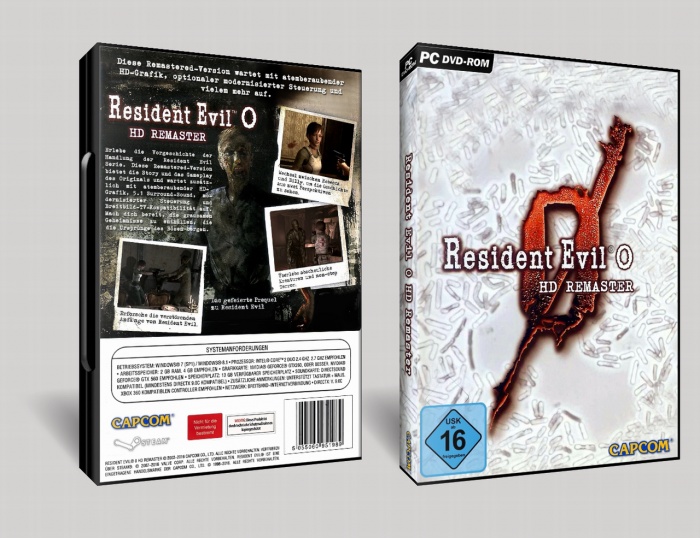
    Free Download Resident Evil Zero Full Version

    Free Download Resident Evil Zero Full Version


    Free Download Resident Evil Zero Full Version - RonanElektron

            Resident Evil memiliki versi baru yang bisa kamu download dan mainkan di pc mu. Kali ini adalah seri Zero yang tentunya memiliki berbagai kejutan yang hanya bisa kamu temukan dalam game ini. Lawan semua zombie dan pecahkan misteri yang sedang kau hadapi, sehingga bisa menamatkan game yang super seram dan menegangkan ini.


    Minimal Requirements
    OS: Windows® 7 SP1 / Windows® 8.1
    Processor: TBAIntel® Core™ 2 Duo 2.4 GHz, or better
    Memory: 2 GB RAM
    Graphics: NVIDIA® GeForce® GTX260, or better
    DirectX: Version 9.0c
    Network: Broadband Internet connection
    Storage: 23 GB available space
    Sound Card: DirectSound compatible (must support DirectX 9.0c or higher)
    Additional Notes: Supports Keyboard +Mouse. Genuine Xbox 360 PC compatible controller recommended.


    Recommended Requirements
    OS: Windows® 7 SP1 / Windows® 8.1
    Processor: Intel® Core™ 2 Quad 2.7 GHz, or better
    Memory: 4 GB RAM
    Graphics: NVIDIA® GeForce® GTX 560, or better
    DirectX: Version 9.0c
    Network: Broadband Internet connection
    Storage: 23 GB available space
    Sound Card: DirectSound compatible (must support DirectX 9.0c or higher)
    Additional Notes: Supports Keyboard +Mouse. Genuine Xbox 360 PC compatible controller recommended.


    Screenshot:

    Free Download Resident Evil Zero Full Version - RonanElektron

    Free Download Resident Evil Zero Full Version - RonanElektron

    Free Download Resident Evil Zero Full Version - RonanElektron

    Free Download Resident Evil Zero Full Version - RonanElektron

    Free Download Resident Evil Zero Full Version - RonanElektron

    Free Download Resident Evil Zero Full Version - RonanElektron


    Download Link:
    Download Resident Evil Zero


    *Note: Jika muncul hitungan mundur 5 detik, ditunggu aja sob, lalu klik SKIP AD

    Free Download Resident Evil Zero Full Version - RonanElektron

    download now

    Read More

    Thursday, August 25, 2016

    Download Film Crows Zero 3 Explode 2014 Terbaru Bluray 720p

    Download Film Crows Zero 3 Explode 2014 Terbaru Bluray 720p


    Nih sekedar tambahan film buat penggemar film action di tanah air, film asia yang salah satu ini memang sudah banyak di akui kepopulerannya, apalagi di Indonesia banyak anak usia remaja gemar menonton bahkan meniru gaya si Genji (tokoh utama), oke saya lanjutkan kualitas cerita film ini cukup menarik tidak kalah dengan action2 film barat, hanya saja satu film ini memberikan kesan yang unik yang sebelumnya juga sukses membuat tenar di versi Crows Zero 1 dan 2, Berikut ini saya sediakan informasi cerita, review, dan juga link download berkualitas Bluray 720p yang tentunya tidak di ragukan lagi.


    Sinopsis Film Crows Zero 3 Explode :  Menceritakan kehidupan Sebulan setelah kelulusa Genji Takiya di , sehingga sulit mengharapkan kehadiran Genji Takiya atau Tamao Serizawa untuk hadir di Crows Zero seri ke-tiga ini. Walau pun pemain seperti Katagiri (Kyosuke Yabe), Megumi Hayashida/Rindaman (Motoki Fukami) dan Takashi Makise (Tsutomu Takahashi) bisa dipastikan akan hadir kembali.Perkelahian baru pun dimulai untuk melihat siapa yang akan naik ke atas di Suzuran High School. Sementara itu, pertempuran melawan sekitar Kurosaki Industrial SMA juga dimulai. Langsung download bila sudah tidak ragu lagi, terima kasih.


    Link Download:

    • Download Crows Zero 3 Explode ( 900MB ) 
    • Download Subtitle Indonesia  

    download now

    Read More

    Friday, August 19, 2016

    Free Facebook with Picture Smart Globe Zero Load

    Free Facebook with Picture Smart Globe Zero Load


    New opera mini created by jun esguerra from symbianize that lets you surf the net without load. First download BladeOM HandlerUI 7.53 here.

    also read ?  Free Mobile Internet without Load (Talk N Text)

    Opera Mini handler setting for any sim (free Facebook with images)
    • remove port: put check
    Free Facebook with Picture
    • proxy type:reverse proxy
    • proxy server:185.23.127.251
    Free Facebook with Picture

    • Tap Save
    • Then go to settings>advanced>protocol and set to HTTP
    Now you can enjoy Free Facebook with images without Load (Smart, Globe).

    download now

    Read More