Showing posts with label booster. Show all posts

Tuesday, September 20, 2016

Iobit Driver Booster PRO 3 0 3 261 full

Iobit Driver Booster PRO 3 0 3 261 full


Iobit Driver Booster PRO 3.0.3.261 full terbaru

Iobit Driver Booster merupakan Software untuk Mendeteksi Update Driver kita secara otomatis ini keluaran Iobit, siapa yang gak kenal dengan product Iobit, ane sendiri akui bagus, dari mulai Advanced system care, Advanced Mobile Care, dan masih banyak lagi tentunya.

Kali ini Iobit Driver Booster PRO 3.0.3.261 telah di rillis versi barunya. Pruduct ini di khususkan untuk mendeteksi Out Of date driver komputer kita, dan mendownloadnya secara otomatis dari server Iobit. buat kita yang ingin mencoba seberapa besar ketangguhan software ini dalam mendeteksi Driver . di persilahkan.


Iobit Driver Booster PRO 3.0.3.261 full terbaru

What’s new in version 3.0.3:
  • Larger Database – Support over 200,000 drivers
  • Expanded Game Components Database
  • Include VC Runtime 2008, VC Runtime 2010, and VC Runtime 2012
  • Full Support for Windows 10 – Powerful database provides driver updates after Windows upgrade
  • Added Auto Download Feature
  • Download drivers at system idle time and save update time by half or more
  • Added Search Feature – Find devices rapidly and accurately
  • Added Auto-backup Feature
  • Help restore unwanted driver updates anytime
  • Added Device Fix Feature
  • Detect missing and faulty drivers to fix device problems securely
  • Optimized Uninstall Feature
  • Clean up unplugged devices no longer used
  • Upgraded Engine
  • Scan and install outdated drivers more precisely and quickly
  • New UI – Brand-new user friendly GUI and provide 3 skins: Black, White, and Interstellar

Support : Windows XP/Vista/7/8/8.1/10
  • Putusin koneksi Internet dulu Wajb !!
  • Edit “Host” open with notepad ++ di C:WindowsSystem32driversetc
  • lalu tambahkan Line Tulisan berikut ini di bawah nya
127.0.0.1 idb.iobit.com

Contoh:


Nb. Jika Host nya tidak dapat di save, Copy dulu Host ke Drive D, nanti setelah berhasil di save, baru Pindahkan ke C:WindowsSystem32driversetc lagi
Install Software
Copy “register,dll” dan paste ke
  • C:Program Files (x86)IObitDriver Booster
  • jika gagal nge-Replace, gunakan =>iObit Unlocker
  • lalu jalankan program, klik tanda Kunci di pojok atas
  • Masukan serial yang disediakan
  • Done, jadi Pro
  • hidup kan koneksi internet dan scan driver nya
  • enjoy
  • salam luar biasa
Sebelum Update Driver , Lakukan System restore, guna, ketika ada permasalahan bisa langsung di kembalikan kedalam kondisi normal
Size : 14 Mb

direcLink
=> Iobit Driver Booster PRO 3.0.3.261 Full

direcLink
=> Iobit Driver Booster PRO 3.0.3.261 Full

source: www.kuyhaa-android19.com

download now

Read More

Sunday, August 28, 2016

Download IObit Game Booster Premium 2 41 Final Full Patch Keygen

Download IObit Game Booster Premium 2 41 Final Full Patch Keygen


Kali ini saya akan bagikan software yang sangat luar biasa bagi sahabat yang suka bermain game. Saya yakin sahabat yang suka bermain game tahu dengan game booster ini.
Iobit game booster ini adalah software yang berfungsi untuk meningkatkan kinerja game pada PC kita karena pada game booster ini terdapat game box yang dimana apabila kita memainkan game lewat gamebox ini secara otomatis gamebooster ini akan meningkatkan kinerja game yang kita mainkan.
Sebenarnya Iobit game booster ini ada yang versi gratisnya. Namun, yang akan saya share kali ini adalah versi premiumnya yang sudah tentu saja lebih mantab daripada game booster yang gratisan.
Kalau sahabat haramain software pernah mengalami bermain game namun kualitas gambar pada game tersebut tidak sesuai dengan aslinya atau jelek, gunakan game booster ini untuk meningkatkannya agar sesuai dengan yang aslinya.


Link Download :
  
? Download G.B. Premium 2.41 + Patch + Keygen ( Sharebeast 4,6 Mb )
? Download G.B. Premium 2.41 + Patch + Keygen ( Link Alternatif4,6 Mb )


Cara Install :
  1. Extract GB.Premium.2.4.1
  2. Kemudian Jalankan gamebooster.exe kemudian install
  3. Sebelum klik Finis Hilangkan terlebih dahulu centang pada Launch Game Booster
  4. Kemudian Buka folder activator dan copy file patch.exe dan pastekan di Local C/Program files/IObit/Game Booster
  5. Kemudian jalankan patch.exe dengan cara klik kanan kemudian run as administrator dan kemudian klik Patch dan tutup saja lagi patch tersebut
  6. Sekarang jalankan keymaker.exe dan klik generate dan kemudian gunakan serial tersebut untuk registrasinya.
  7. Selesai.
Jika ada masalah silahkan tinggalkan komentar agar bisa saya bantu dan biasakan berkomentar yang sopan karena saya yakin berkata sopan akan membuat kita semakin baik.


* Jika Sahabat ingin meriquest, silahlan tinggalkan komentar sahabat dikolom komentar atau sahabat bisa inbok saya difacebook dan chat di BBM
- FACEBOOK : Rizky Rastafara
- Pin BB : 7D71DCDB

download now

Read More

Tuesday, August 9, 2016

Root Booster Full v2 3 0 Apk for android

Root Booster Full v2 3 0 Apk for android


Root Booster Full v2.3.0 Apk for android
Root Booster is a Tools App for android.
Download last version of Root Booster Apk for android from adhedroid with many link.

Root booster is for root users who need more performance to run applications smoothly without lags or for those who need to improve a poor battery life
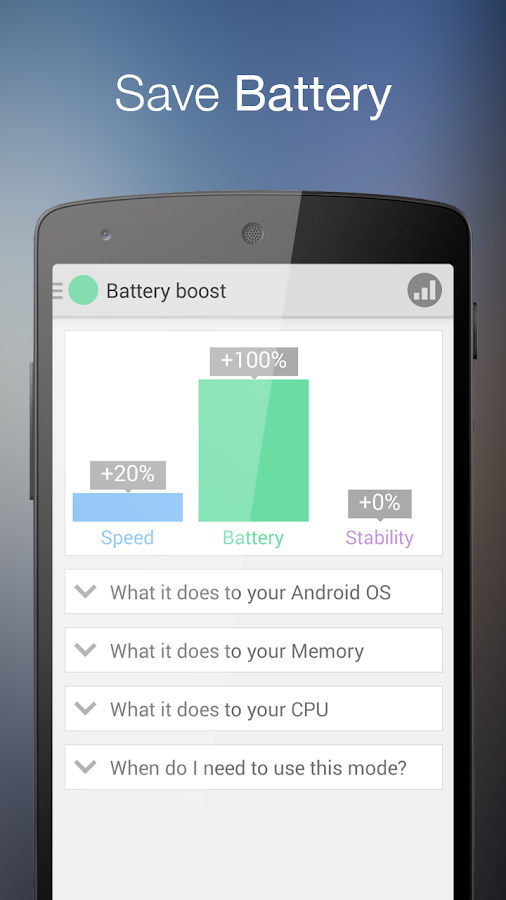
There are many apps that save battery or increase performance, however Root Booster uses the most proven settings to achive the best results. You can easily apply these settings with preset modes which ensure speed boost, battery boost or stability boost. These modes are achieved by applying appropriate settings to the main phone components. Here are some explanations for what particullary Root Booster does to your CPU, RAM and Android OS system.

Hibernation (Android OS optimizer)
Each Android application can have one or multiple services. They run in the background and usually perform some kind of task. Many people think that when they kill an application, it completely stops draining your battery and computing power, but thats not true. Application still have servicies that are running after killing and still drains battery and comuting power. On the other hand, if you hibernate an application it stop its servicies and application does not drain battery and CPU computing power anymore. Hibernation is gently and efficient way to save your battery and increase performance.
Root Booster will find battery draining and performance demanding applications and auto hibernates them.

CPU (processor governor control) 
A governor is a driver for the regulation of CPU frequency. Governor decides how fast and when will be achieved maximal or minimal CPU frequency. Setting apropriate governor makes your device more battery saving, fast or even more stable. However, deciding which governor is suitable is a little bit tricky.
Root Booster can decide which governor you should use and automatically applies the most suitable governor for the selected mode.

RAM (memory manager)
Each application uses VM heap for it s data and work. The main reason to change the VM heap size is stability improvement. Many big applications need a big amount of memory (VM heap) for their work. If the VM heap size is smaller than the requested memory, it causes an application crash (Out of memory error). Setting heap size is hard task and there is no manual to set up for better performance. Better performance can be only achieved by testing.
Root boster will test your RAM and sets up your VM heap size for better stability and performance.

Note: Root Booster is designed to work with rooted devices
Disclaimer: Root Booster is proved by thousands of users and have the auto backup system, but we do not have responsibility for damaging your device.

Root Booster Full v2.3.0 Apk for androidRoot Booster Full v2.3.0 Apk for androidRoot Booster Full v2.3.0 Apk for androidRoot Booster Full v2.3.0 Apk for android

Link Download:
Root Booster Full v2.3.0 Apk via KumpulBagi | MediaFire | Zippyshare

download now

Read More